TRAIN TRACK® Web Edition Help Manual
Add Training (Non-Control Document)
TRAIN TRACK® allows you to add training records that are not conrolled documents (or add controlled documents).
Note: You may also add training records by importing them from Excel®.
Add Training
To add a training, follow these steps
| Step | Illustration |
| 1. From the navigation bar, select Training > Add Training. | 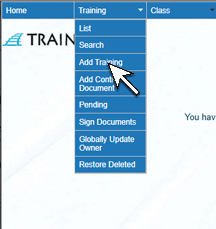 |
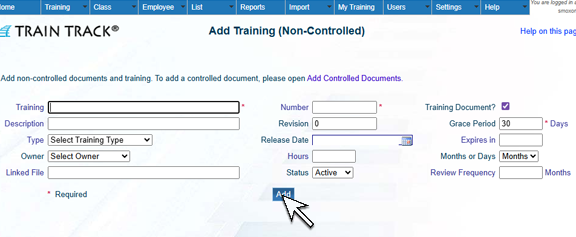
2. The Add Training screen will open. Enter the Training Title and Training Number. You may also add Description, Type, Owner, Linked File, Review Frequency, Revision, Release Date, Hours, Status, Grace Period and Expiration Period. Click Add.
|
 |