TRAIN TRACK® Web Edition Help Manual
Import Training Completion Records
TRAIN TRACK® allows you to import training completion records from a template. When you import training completion records, the training title or number, and employee name or ID number, must match existing database records in order for the completions to be recorded correctly.
If you want a specific revision recorded with the completion, you will need to include it in your import.
Import Training Completion Records
To import training completion records, follow these steps
| Step | Illustration |
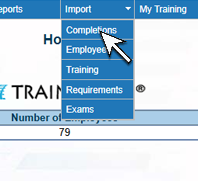
1. From the navigation bar, select Import > Completions. |
 |
| 2. The import screen will open. Click the Download link to download the template. | 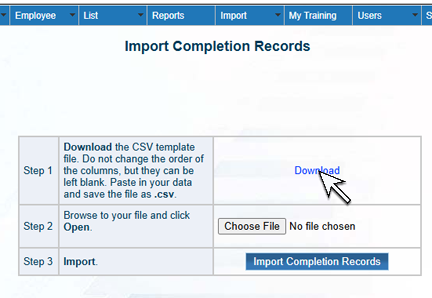 |
| 3. A browse box will open. Browse to where you want to save the file and click Save. Make a note of where you saved the file. | 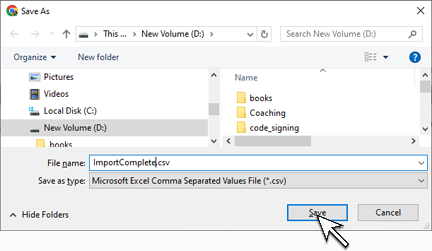 |
| 4. Open the file you saved by clicking the download icon on your browser. A list of downloaded files should open. Click on the file name. Note: if you do not see the option to open the file from your browser, locate the file from Windows Explorer and open it. | 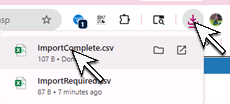 |
| 5. Paste your data into the Excel template. You will need to leave all of the column headings in place (do not alter them or move them), and paste your data below them. If you don't have data for some of the columns, just leave them blank. Please see below for details about the data you may paste into each column. |  |
| 6. Save the file as a .csv file. | |
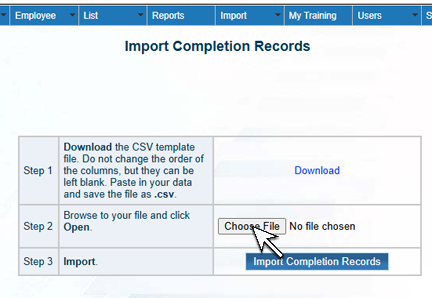
7. Click Choose File (or Browse, depending on your web browser). Browse to the file you saved above and click Open.
|  |
| 8. Click Import Completions. The status of your import will be displayed along with any error messages. | 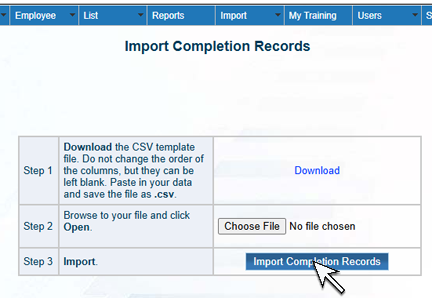 |
Training Completion Template Columns
The template used to import training completion records includes the following columns:
Training Title: Training title.
Training Number: Training number.
Last Name: Employee last name.
First Name: Employee first name.
Employee ID: Employee ID Number.
Date Complete: Date training completed.
Cost: Cost of training.
Score: Exam score.
Pass: Exam passed? ("TRUE" or "FALSE").
Revision: The revision completed.