TRAIN TRACK® Web Edition Help Manual
Revisions
TRAIN TRACK® keeps track of your training or document revisions, and also allows you to track revisions for controlled documents, collect signatures, and release the new revision.
A document may be associated with each revision. The current revision is displayed with each training record. Each time a training is completed, the current revision number is stored with the completion record. When you release a new revision, you can decide if employees need to be re-trained on the new revision or not. If you indicate that re-training is required, then all completions from the previous revisions will be expired on the new revision release date. You can also view the revision history for each training or document.
The process for adding a new revision will be different for controlled and non-controlled documents. For non-controlled documents, you can release the revision right away. For controlled documents, all of the required signatures need to be collected before the document can be released.
Please note that you may only delete revisions for non-controlled documents. Controlled document revisions will be set to "Obsolete" when a new version is released.
To delete a revision, follow these steps
| Step | Illustration |
| 1. From the navigation bar, select Training > List. | 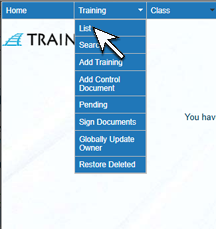 |
| 2. The Training List screen will open. Click the Training Title. | 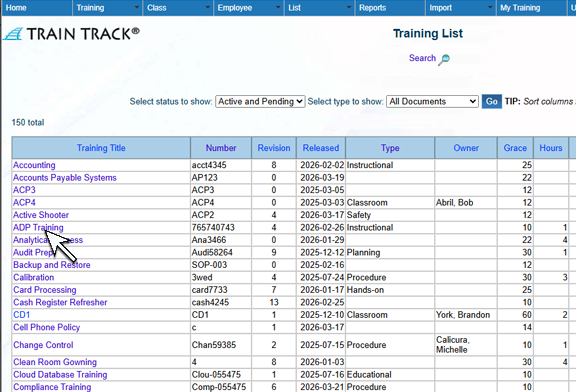 |
| 3. The Training Detail screen will open. Click Revision. | 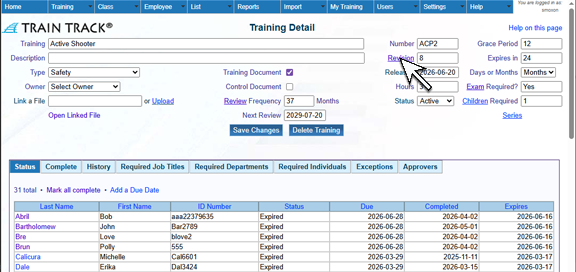 |
| 4. The Revision screen will open. Click on the Revision you wish to delete. | 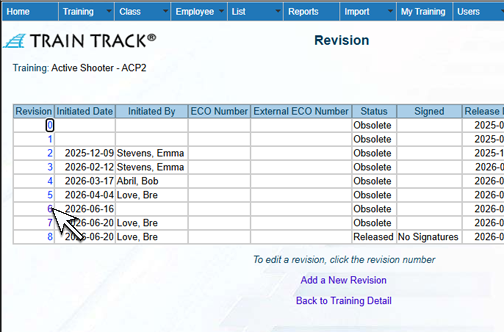 |
| 5. The Revision Detail screen will open. Click Delete Revision. | 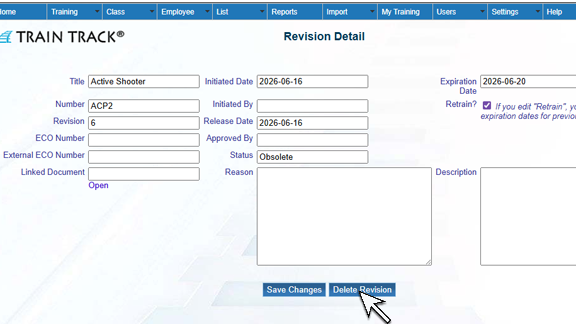 |
| 6. The Delete Revision screen will open. Click Delete. | 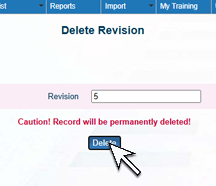 |