TRAIN TRACK® Web Edition Help Manual
Add Employee
TRAIN TRACK® allows you to add employee records manually.
Note: You may also add employee records by importing them from Excel®.
Add Employee
To add an employee, follow these steps
| Step | Illustration |
| 1. From the navigation bar, select Employee > Add Employee. | 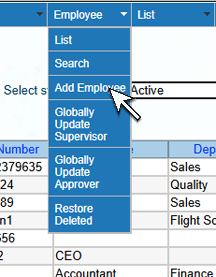 |
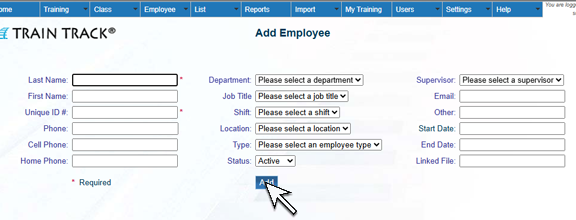
2. The Add Employee screen will open. Enter the Employee Name and a unique ID Number. You may also add Phone numbers, select a Department, Job Title, Shift, Location, Employee Type, Status, Supervisor, and enter Email, Other, Start Date, End Date and Linked File. Click Add.
|
 |